VPS hacked: Initial bells, how the attack worked, migitations
I run a small VPS that hosts a few services, just personal stuff. One day, I received an email from my VPS provider that some company is reporting sophisticated attack traffic from my IP address. When I tried to SSH into my server, I couldn’t; the packets were getting dropped. Fortunately, I had an openclaw instance there too, so I asked it to inspect the NF tables, and it checked that all the traffic was being dropped except for from one IP address 130.12.180.51. I asked it to revert the change and give me back access. Once I had the access, I used Htop to check what was happening, my jaw dropped. CPU pinned, weird sshd activity, and the general feeling that something was using my box for something that definitely wasn’t my workload.
This is the story of how I confirmed the compromise, what evidence I gathered, and what I changed afterward so it doesn’t happen again.
The first red flags
The initial symptom was simple: CPU at ~100%** , w**hile the services that I run there should not utilize more than 10 to 20%.
When I checked what was actually running, a few things stood out as “this is not normal”:
an
.sshdprocess that looked likesshd:root@nottya suspicious binary running from an unusual location:
/etc/kswpadanother suspicious binary that should not exist on a clean system:
/usr/bin/.sshdlots of outbound ssh connections that made it look like the host was being used as a
scanner/pivot** **
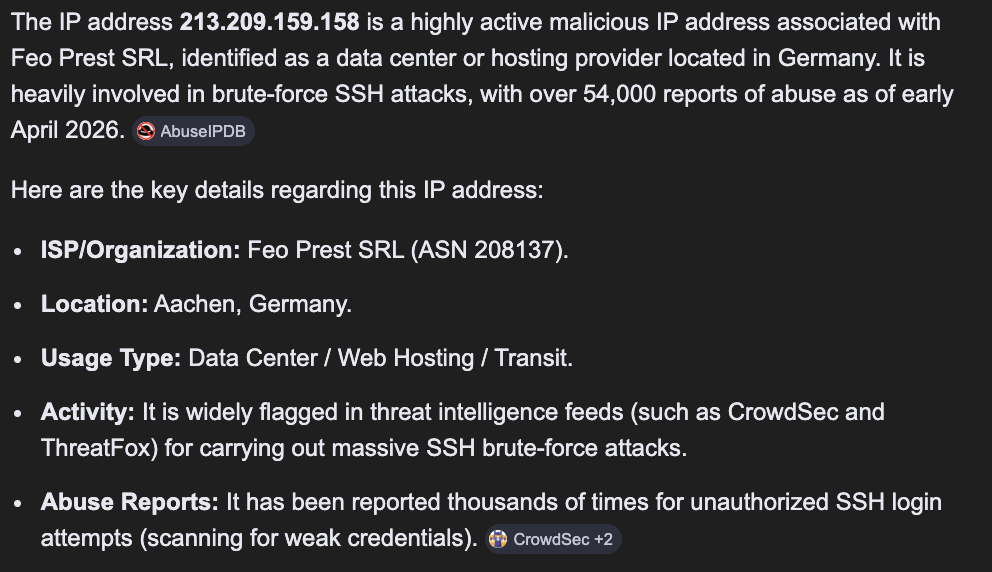
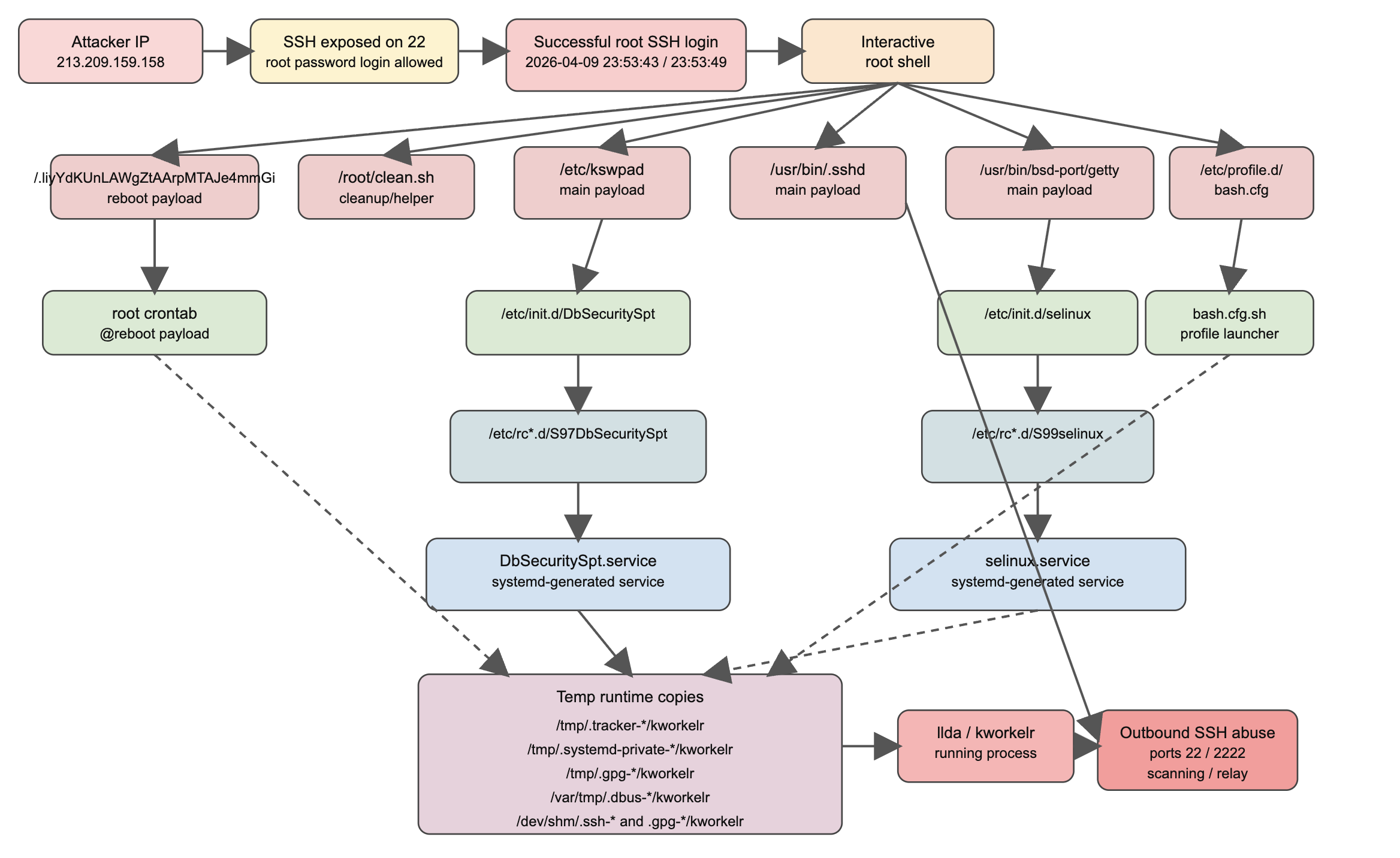
My initial thought was that due to weaker security, OpenClaw might have somehow given some access or some open port that the hacker used to infiltrate. After checking the SSH logs, I found out that from 213.209.159.158, I got a successful login attempt after more 100k failed attempts.
Accepted password for root from 213.209.159.158
That line appeared twice around the same time:
Apr 09 23:53:43 — Accepted password for root from **213.209.159.158*
A bit of information about this IP. This IP has been heavily reported for malicious cyber attack activities using SSH brute force attack. Most of the VPS providers have blocked this address. I flagged this to Contabo so that they can also block this and avoid these kinds of attacks on their infrastructure.
What the attacker dropped (persistence + payload)
I’m trying to find why these sshd daemons were taking more than 100% of my CPU. I found, using ss and other tools, that a lot of connections were outbound. I found multiple suspicious artifacts consistent with a persistence kit:
/.liyYdKUnLAWgZtAArpMTAJe4mmGi/etc/kswpad/usr/bin/.sshd/usr/bin/bsd-port/getty/etc/profile.d/bash.cfg/etc/init.d/DbSecuritySpt(hook used to launch/etc/kswpad)/root/clean.shtmp/.../kworkelr/var/tmp/.dbus-*/kworkelr/dev/shm/.ssh-*/kworkelr
Note: There were multiple persistence layers, not just one.
Layer 1: reboot cron job. That means: on boot, root’s cron would run that hidden ELF binary. We removed that.
- @reboot
/.liyYdKUnLAWgZtAArpMTAJe4mmGi
Layer 2: SysV init scripts: /etc/init.d/DbSecuritySpt and /etc/init.d/selinux. And they had runlevel symlinks in /etc/rc*.d/… That means: at boot, the old SysV startup system would start them.
Layer 3: systemd-sysv-generator. Ubuntu uses systemd, but it still supports old /etc/init.d scripts by auto-generating transient systemd units from them.
- /etc/init.d/DbSecuritySpt → generated DbSecuritySpt.service
- /etc/init.d/selinux → generated selinux.service
That’s why after I killed these processes and also removed these files, they were still keeping on coming back. The already-generated and already-running service state kept things alive until I explicitly stopped those units and reloaded systemd.
Extra evidence: outbound SSH from root history
We also saw entries in /root/.bash_history indicating the box was being used to SSH outward:
ssh root@178.62.14.210ssh root@38.57.129.82
Whether those were attacker infrastructure or other victims, the implication was the same: this host was being used as a stepping stone.
(And yes — shell history is imperfect evidence because it can be modified, and it can include my own later investigation commands too. But it still supported the bigger picture.)
What tmp/…/kworkelr (deleted) meant?
What I saw using /proc/…/maps, was that these malicious processes had files that were deleted by the name of Kworkelr, which meant that they were trying to hide the binaries/payload after loading in memory. When Linux runs a binary, it loads it from disk into memory.If the file is then deleted from disk after launch, the process keeps running.
- /tmp/.tracker-.../kworkelr (deleted)
- /tmp/.systemd-private-.../kworkelr (deleted)
- /tmp/.gpg-.../kworkelr (deleted)
it meant some persistence mechanism created a temp copy of the malware, launched it,deleted the file to hide it and the process kept running from memory. After spending a few hours, I finally had a working understanding of how the malicious binary will being respawned.
What I did next (containment + rebuild)
Once I had enough evidence, the priority was to make sure that these outbound connections cannot be made again. If the malicious process respawned again, I wanted to avoid DOS from my server. I disabled the outbound connection to the SSH port using the nftable; then I moved all these evidence to an incident folder and zipped it so that I can take them out. Then I finally decided to reinstall the server and move the evidence there and deploy my services which were easy to migrate to the new server.
Hardening security on new server
On the new server, I made the baseline changes that should have been there from day one:
Disabled root SSH login
Explicitly denied root via SSH (DenyUsers root)
Restricted SSH access at the firewall layer: allow SSH only from my CIDR
My next step is trying to reverse engineer these binaries, using tools like strings and insider, to actually look inside these ELF files and figure out what was actually happening. This will be the topic for next blog.