Optimizing Local Socket Communication: connecting netns and direct communication(part 2)
This article walks through setting up an isolated test environment using Linux network namespaces and veth pairs, then demonstrates the eBPF socket redirect in action(continuation of part 1). We’ll see messages fly directly from one socket to another, skipping the TCP/IP stack entirely.
Required: Root access (for namespace/cgroup/BPF operations).
Network Namespaces and connecting with veth
A network namespace is a complete, isolated copy of the network stack — its own interfaces, routing table, iptables rules, and sockets. Processes in different namespaces cannot see each other’s network traffic by default.
# Create two namespaces
sudo ip netns add A
sudo ip netns add B
At this point each namespace has only a loopback interface, and it’s DOWN:
 Namespace A                          Namespace B
┌─────────────────────┐              ┌─────────────────────┐
│                     │              │                     │
│   lo (DOWN)         │              │   lo (DOWN)         │
│   No other ifaces   │              │   No other ifaces   │
│                     │              │                     │
└─────────────────────┘              └─────────────────────┘
Bring loopback up so localhost works inside each namespace:
sudo ip -n A link set dev lo up
sudo ip -n B link set dev lo up
 Namespace A                          Namespace B
┌─────────────────────┐              ┌─────────────────────┐
│                     │              │                     │
│   lo (UP)           │              │   lo (UP)           │
│   127.0.0.1  ↺      │              │   127.0.0.1  ↺      │
│                     │              │                     │
└─────────────────────┘              └─────────────────────┘

     (loopback works internally, but A and B still can't talk)
Why bring lo up? Many applications expect
localhost/127.0.0.1to be reachable. Withoutloup, even internal self-connections fail.
sudo ip -n A link add name veth0 type veth peer name veth0 netns B
Both ends can share the name veth0 because they live in different namespaces.
 Namespace A                          Namespace B
┌─────────────────────┐              ┌─────────────────────┐
│                     │              │                     │
│   lo (UP)           │              │   lo (UP)           │
│   127.0.0.1  ↺      │              │   127.0.0.1  ↺      │
│                     │              │                     │
│   veth0 (DOWN) ●────┼──────────────┼────● veth0 (DOWN)  │
│                     │  virtual     │                     │
└─────────────────────┘  cable       └─────────────────────┘

          (veth pair created, but still DOWN — no traffic)
# Assign IP addresses
sudo ip -n A addr add 10.0.0.1/24 dev veth0
sudo ip -n B addr add 10.0.0.2/24 dev veth0

# Bring the interfaces up
sudo ip -n A link set veth0 up
sudo ip -n B link set veth0 up
 Namespace A                          Namespace B
┌─────────────────────┐              ┌─────────────────────┐
│                     │              │                     │
│   lo (UP)           │              │   lo (UP)           │
│   127.0.0.1  ↺      │              │   127.0.0.1  ↺      │
│                     │              │                     │
│   veth0 (UP)        │              │        veth0 (UP)   │
│   10.0.0.1/24  ●════╪══════════════╪════●  10.0.0.2/24  │
│                     │              │                     │
└─────────────────────┘              └─────────────────────┘

               A can now ping 10.0.0.2  ✓
               B can now ping 10.0.0.1  ✓
From the namespace A, ping the ip of the other end of the veth.
sudo ip netns exec A ping -c 2 10.0.0.2
5. Starting the eBPF Redirect
Now we bring in the BPF socket redirect from Article 1.
5.1 Start the userspace loader
In a dedicated terminal (as root):
# Run the loader — it creates test.slice and attaches both BPF programs
sudo RUST_LOG=info cargo run --package sock-redirect --release # if using the config.toml with sudo -E , sudo not required.
You should see:
[INFO] Created cgroup at /sys/fs/cgroup/test.slice
[INFO] sockops program attached to /sys/fs/cgroup/test.slice
[INFO] sk_msg program attached to SOCK_MAP
[INFO] Sock redirect is active.  Press Ctrl-C to stop.
5.2 Move processes into the cgroup
Any process we want the BPF programs to observe must be inside test.slice.
We’ll do this from inside each namespace.
sudo apt-get install sockperf
# Terminal for namespace A (server)
echo $$ > sudo /sys/fs/cgroup/test.slice/cgroup.procs
sudo ip netns exec A sockperf server -i 10.0.0.1 --tcp --daemonize

# Terminal for namespace B (client)
echo $$ > sudo /sys/fs/cgroup/test.slice/cgroup.procs
ip netns exec B sockperf ping-pong -i 10.0.0.1 --tcp --time 30
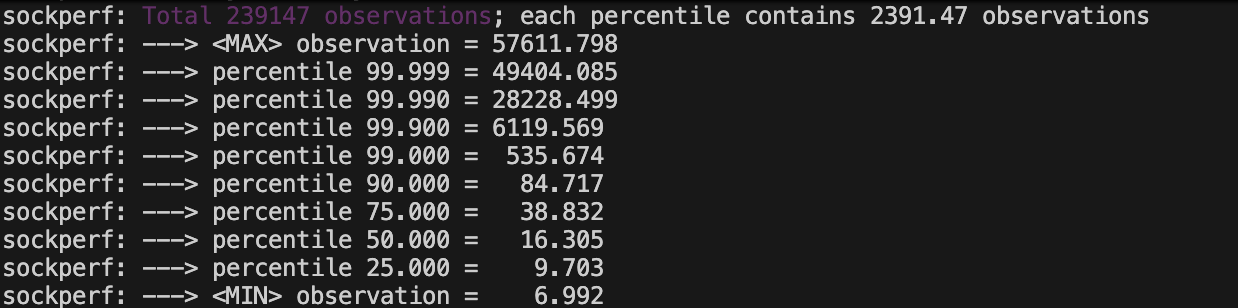
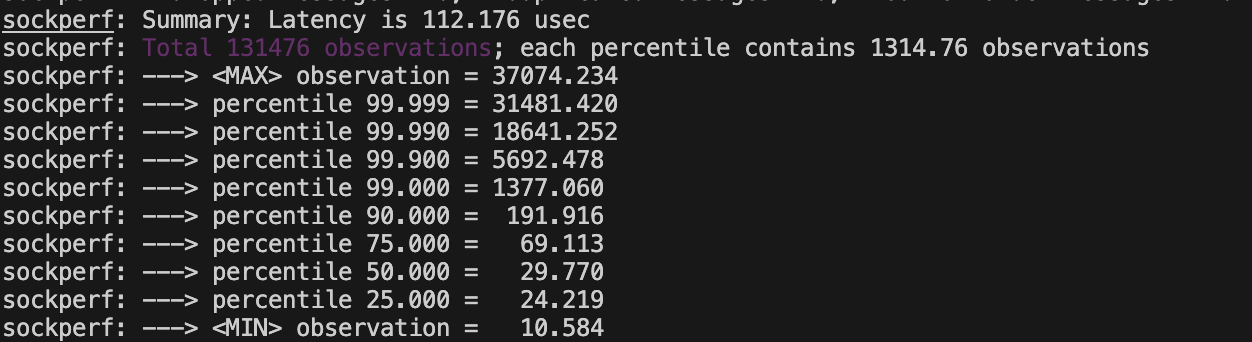
If we stop the ebpf loader user program, and run the socketperf ping-pong we will see average time increase from 63 usec to 112 usec.
What’s happening under the hood
 Client (ns B, port 54321)                Server (ns A, port 8080)
 ┌───────────────────┐                   ┌───────────────────┐
 │                   │                   │                   │
 │  nc sends "hello" │                   │  nc recv "hello"  │
 │       │           │                   │       ▲           │
 │       ▼           │                   │       │           │
 │   ┌────────┐      │                   │   ┌───┴────┐      │
 │   │ socket │      │   sk_msg fires    │   │ socket │      │
 │   │ :54321 ├──────┼──────────────────►┼───┤ :8080  │      │
 │   └────────┘      │   redirect_msg()  │   └────────┘      │
 │                   │   BPF_F_INGRESS   │                   │
 │                   │                   │   delivered to    │
 │                   │   NO TCP/IP stack │   recv queue      │
 │                   │   traversal!      │   directly!       │
 └───────────────────┘                   └───────────────────┘
The message goes directly from the client’s socket to the server’s socket receive buffer. The TCP/IP stack, netfilter, checksumming — all bypassed.